
Safe Mode vs Normal Mode
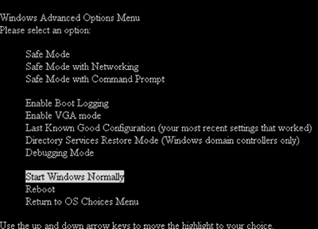
If you have used a computer installed with a windows operating system for a considerable period of time, no doubt you have come across a screen similar to the one shown below during the boot up of the computer. This often appears when there is a problem in the computer, which is likely to have occurred in the earlier operation. (For example, when the computer is switched off without proper shutdown procedure)
As you can see in the screen shot below, “Start Windows Normally” is an option amongst many others for startup, and also different safe mode options are available. Hence, it`s clear that there is a difference in the computer operation during the safe mode and a normal windows startup.
Normal Mode
计算机软件和ha的集合rdware. In essence, software is sets of instructions. Simply said, hardware are the physical devices that form a setup that can follow these instructions. Operating system is a special form of software known as the system software. Its purpose is to create a platform for hardware devices to work, and in turn, the instructions for the hardware are provided by the operating system or a component attached to it.
The software components that provide instructions to each and every hardware component are known as drivers. Based on the hardware used, the driver is utilized by the operating system. A computer can be connected to the internet in many ways; through the network cables, Wi-Fi, HSPA modems, and so on. Each method involves different hardware device. Operating system is provided with a driver for each hardware involved (network adapter, Wi-Fi–, HSPA modem).
When a computer starts (during boot-up) in the Normal mode, all the drivers related to the hardware configuration is initiated by the operating system, allowing each hardware device to communicate with the operating system and function properly. Therefore, network drivers, drivers for scanners, printers, and graphics are all available. But all of these are not necessary for the computer to function. There are instances where having so many drivers become a shortcoming. Especially, when troubleshooting a problem with the operating system.
Safe Mode
Windows and many other operating systems (such as Mac OS) offer a special instance for diagnostics purposes. In which, only the default and minimum operable configuration of drivers are loaded. Often, these are drivers of the devices that are needed for minimal operation and input/output to the computer so that, commands to the operating system can be given and information received. This makes the system operate in reduced functionality. (For example, high resolution graphics and high definition sound will not work.)
This allows diagnostics to be carried out on the system without interference from the other hardware and software so that the problem can be isolated easily.
In this case, the network drivers are also not loaded. Therefore, a special variant of the safe mode is given with the capability to load the network drives too. This allows troubleshooting the network related problems, and sometimes, to get remote assistance.
What is the difference between Safe Mode and Normal Mode?
• Normal mode (which is not an exact technical term) is the default operation mode of a computer operating system, while safe mode is a diagnostic mode for troubleshooting issues in a computer system.
•在正常模式下,所有的车手哈rdware configuration in the computer is loaded. In the safe mode, only drivers required for minimal operation conditions are loaded so that instructions can be given and information received from the operating system. Any additional features such as scanners, network drives, and some high level application software might not work in this mode.

Leave a Reply